Pokazywanie postów oznaczonych etykietą ios. Pokaż wszystkie posty

środa, 25 listopada 2015

Things I've learned while building an iOS SDK

There are times in programming when you think "I wish I knew that from the beginning". Building an SDK is quite different from making an app. You have more things to remember about and the distribution is more tricky. It's also a big responsibility, because if you screw something up, you can't just update right away - you might have a lot of users, and you don't control when they update your library and push to the store. This is a list of my i-wish-i-knews when building the Pulsate SDK. 

My SDK is too big!

I've started building the SDK with writing it from scratch, instead of refactoring the old code. One of my goals was to make the SDK smaller, as it was about 20 mb. When I finished an early version I was shocked to find out that the SDK still weighs the same. Only when I've educated myself about how does clang actually work - while writing this post - I realized that it's ok.

There's a big difference between a library and an executable. Library contains a lot of metadata that weighs a lot. Also, you want your static library to contain a lot of slices, including the simulator ones. The final executable strips all unneeded parts, making our demo executables with as much as 1 mb (with all the graphical assets etc.).

Also, Xcode 7 allows you to use bitcode which will reduce the executable on user's device even more. Remember to make sure you support bitcode in your library by using bitcode linker flags - if you don't, inform your users about that!

Watch out for symbol conflicts

Another big difference when building a library is that it's meant to be linked with someone else's code. Not only do you have to be careful to add prefixes to your classes to avoid symbol duplicates, but you have to make sure that you don't ship your dependencies (like AFNetworking) without making sure they're not going to clash with users using them too - It's not a problem if your code is open source and you're using CocoaPods, but it's a problem if you're shipping a compiled library. I've explained it in more detail in my other blog post.

Want to distribute compiled library through CocoaPods?

No problem! I didn't think it was possible, but it is and it's very easy. Our SDK is for commercial use only, so we couldn't open source it obviously. Check out our repo for the .podspec. 

Automate your process

It saves a lot of time to automate the building and distribution process. For a while I was using lipo to create a fat static library, commiting to GitHub and CocoaPods manually. I've written custom scripts that do that automatically now. It takes a couple of seconds to create a new release.

Here's my XCode script that builds both device and simulator, creating a fat library out of them and putting them in the release version folder.


Some things about the .bundle

If you need to ship your .framework with a .bundle (if you have some assets, or a CoreData model) there are some things you need to know.

The first thing that surprised me was that when we tried to publish an app with our SDK, it got rejected. Xcode automatically generates an executable and puts that executable info into the .plist file. You have to remove that executable, and .plist line from the .bundle in order for it to be accepted on iTunes. More here.

You can also distribute the .bundle file with CocoaPods.

Your users might not use some features. Create separate bundles, if you have a lot of assets, so users can choose which assets they need.

Some other tips

• Make sure you always distribute the release version
• Make sure you have a way to see what version of the SDK this is, just by looking into files. It's very useful
• Make sure you add the simulator slices
• If you're using a different server for testing, or any debug features and different for production use C macros and define a DEBUG identifier for debug builds so you make sure it won't get leaked into production like it just did for Vine.


piątek, 19 czerwca 2015

Cocoa Touch Best Practices - WWDC 2015

Launch quickly

The first thing you learn is that you shouldn't do process extensive tasks on UI thread. People sometimes forget that if you do the same in the delegate callbacks you'll freeze UI.
  • Always return quickly from applicationDidFinishLaunching to launch the app as quickly as possible. Your app even might be killed if it takes too long!

Use Background Queues

Loading data from database or server on a main queue through dispatch_async is a basic thing. The problem is that if there are many operations on the main_queue it still may make the UI not responsive. The less time you spend wasting CPU cycles on the main thread, the more responsive your UI will be.
  • When dispatching use a background queue when possible

RAM Usage while suspended

When you go back to an app you instantly resume at the point where you've left it. It's a great thing in mobile devices, that lets us save our time and make the apps more responsive.

The sad truth is that your app might get killed from the suspension state. We want to make sure it lives as long as possible, right ? iOS kills the apps that use the most RAM first!


Don't bet that app!

  • When you get the applicationDidEnterBackground callback make sure you release as much data as possible. Use a background task if you need more time to clean after yourself.

Keep Your Code Unrelated To Time

Sometimes you want to do something after a certain animation finishes. You can predict how long will that animation last and just use a NSTimer and launch a block of code to happen after that time. What if in future iOS updates the time of the animation changes ? Try to keep your code relative to events and callbcks, not time. For example by using UIViewControllerTransitionCoordinator.

Clang compiler under the hood


When you build an iOS application you're not really interested with how does it all work under the hood most of the times. You just place some layout, hit "Run" or "Archive" and that's it. It just works.

It's when you start building your own library you start wondering: how does it all work?

Static Library

Clang is no different than GCC when it comes to compiling and linking. When you compile a static library you create a .a file. The so called archive file is nothing more than just a package of compiled object files. The .o files, which are in ELF format contain not only code, but also the roadmap of the file: symbols and data. This data is needed for the linker to resolve symbols at executable linking time.

When you include a static library to your executable, symbols and code are copied into the file. With -dead_strip flag enabled only the symbols used in your executable are used - it helps in reducing the executable file size.


example of "nm" and "file" programs
You can use nm to list all symbols in a file. As you can see, there are no symbols for functions, because of of Objective-C`s dynamic nature. Function symbols are internal (-g flag of nm shows only external symbols). Because of this, if you have any categories in your static library, you have to put a -ObjC or some other flag like -force_load to your linker flags, or you'll get a crash at runtime, because the functions of the category will not be copied at all, as they are not referenced anywhere. Unfortunately it makes the executable file larger*.

Symbols with U are "unresolved" meaning that they are to be resolved during the executable link time (in case of static libraries).

During the final executable link time, the linker creates a table and searches for all the needed symbols in defined search paths. If it doesn't find a needed symbol it stops the linking process with something you might be familiar with:


oops

Duplicate Symbols Problem

Objective-C doesn't have namespaces. That's why you see every library with a two or three letter prefix. It helps avoids collisions. If someone creates a class XXXModel and links his program with a static library that uses YYYModel he doesn't get a collision.

What if your static library uses AFNetworking and your library's users want to use AFNetworking too ? They'll get a collision. The most common way of solving that is to add a prefix to AFNetworking.

The other way is: using dynamic libraries.

Dynamic Libraries

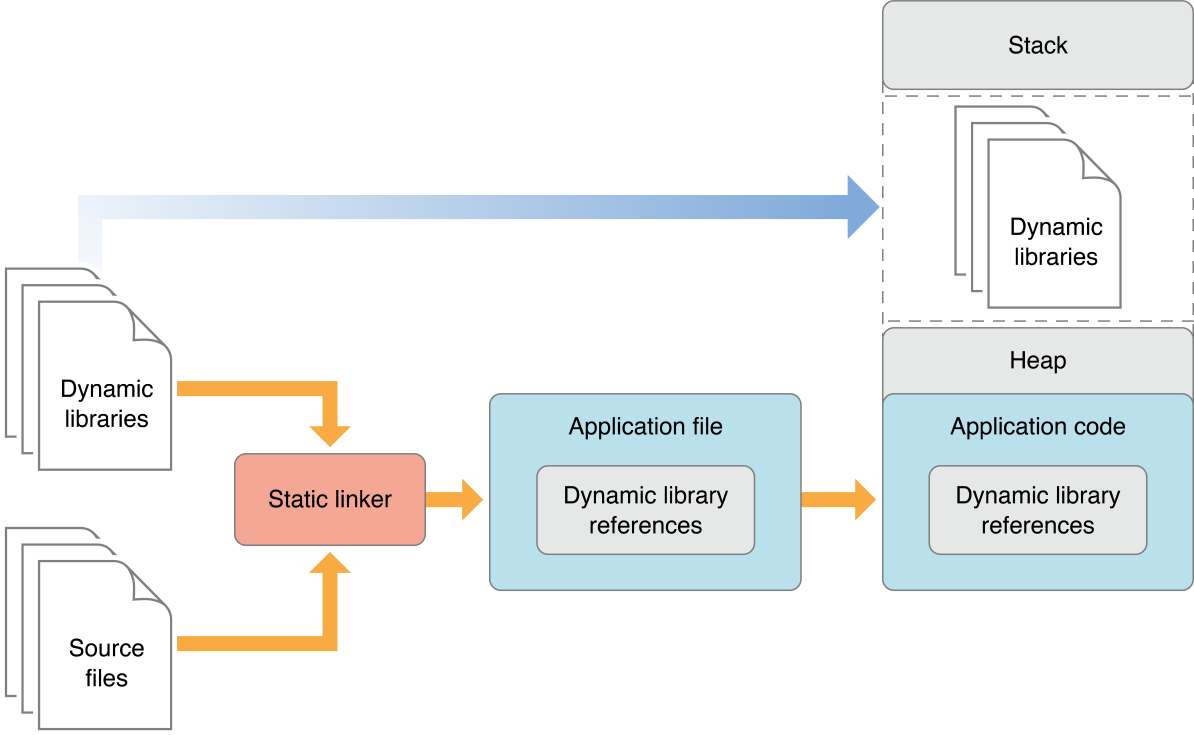
A dynamic library unlike the static library isn't just a collection of code to be linked. It's a collection of code ready to be executed.

When you link your executable the dynamic library has to be present so the linker know what to reference, but the code doesn't get copied to your executable.
source


When a system loads an executable, and that executable has references to dynamic libraries, the dynamic linker searches for these libraries, loads them to RAM fills the code jump pointers for the executable.

Dynamic libraries can drastically reduce the size of an executable, not only because the code doesn't get copied, but also because you get to dynamically load AFNetworking once, not get it precompiled in every library you use.

iOS8 enabled using shared libraries, but they still get copied into the bundle. The only difference is that you can share a library between all your iOS extensions.

CocoaPods

One of CocoaPods' jobs is to manage dependencies. If you include 100 dependencies that depend on AFNetworking it'll only include the code once, not one hundred times. But that's the case for open-source software, not pre-compiled libraries.

-ObjC flag*

As I mentioned earlier -ObjC makes your executable larger, because it forces to load all files containing Objective-C code.

As I mentioned earlier categories are not loaded, because they are not referenced anywhere. What if we were to force reference them ?

Just declare any symbol in the file:


declare an extern int variable

declare the variable
Now you have to use that symbol somewhere so it gets link referenced:

That's it! Now you don't have to force your static library users to link with -ObjC flag.


sobota, 18 kwietnia 2015

Solving the NSNumber mystery


Ignorance is bliss. I used NSNumber and didn't really care how it really works. One day when I had to find out what's inside NSNumber (bool, float or integer) that bubble burst.

It turned out that you can't really find out what NSNumber is holding with simply calling a method on the object, which is kind of illogical, given that you explicitly say what you put inside NSNumber and Obj-C is a dynamic language, right? I don't give up that easily, though. I digged more. What I discovered surprised me greatly.

NSNumber is a class cluster which is a special design pattern used to box private classes in one public class.

That means that we don't have to deal with a dozen of classes, as they are hidden behind the public class.


That also means that NSNumber points to a different Core Foundation class in reality, depending on what you decide it to be.

We can use that knowledge to find out what NSNumber instance is really holding:


So, NSNumber can point to either CFBoolean, or CFNumber. CFNumber can hold any type of number primitive. We cast to (void*) or (CFNumberRef) to keep the compiler happy.

Unfortunately, even though Foundation lets us forget about Core Foundation, sometimes we have to go back and use the lower layer.

Every Objective-C programmer should have some knowledge about underlying Core Foundation framework, as it gives you more control, it can allow you to create some neat hacks (like the one above), and some libraries are Core Foundation exclusive (Keychain access for example).

poniedziałek, 19 stycznia 2015

CoreLocation limitations - how to overcome them ?

Let's say you have 100 items at your small store and you want to get notified in background every time you're in a proximity of each on an iOS app. The answer seems easy, right ? Let's use iBeacons! After some time you finally get to the final conclusion: iBeacons are useless for your shop.

CoreLocation sucks 

Don't get me wrong, CoreLocation is a very good high level library but it's limitations make iBeacons useless in some scenarios. Why ? You can listen to max 20 combinations of beacon UUID / Major / Minor. If you put 100 beacons close to each other with the same UUID, and monitor only for that UUID (major = any, minor = any) you will get only one didEnterRegion callback. You can then start ranging (listening to all beacons), but you can do that only while the app is in foreground.

Apple explains in it's documentation that they do that to limit the OS resources that the apps use. 

"Regions are a shared system resource, and the total number of regions available systemwide is limited. For this reason, Core Location limits to 20 the number of regions that may be simultaneously monitored by a single app. "

UUID has 128 bits, major and minor have 16 bits each. That's 160 bits for every beacon we monitor (there's also an identifier string but let's pretend it doesn't exist).

That's 3200 bits per app, if we assume that 20 is maximum we can monitor for. That's around 0.000381 megabytes. Let's get crazy and crank that maximum up to 800 beacons per app. It would take something like 0.01524 of a megabyte to monitor for 800 beacons at one time! Let's get insane crazy and assume that 100 apps we have installed are monitoring for 800 different beacons.

100 apps monitoring 800 beacons each would take 1.524 megabytes of RAM. I'm not an OS specialist but I think it's not the end of the world, especially that it would be a challenge to find 100 apps like these.

Of course, there's a tremendous challenge of finding the app that is monitoring for this particular beacon while stumbling on any iBeacon. You have to loop through all the 100 apps with 800 beacons, right ? Or you can just be a genius like me and use a hash map.

Why does Apple do this? Probably to not allow waking your app up too often. 

Hack through Apple

How to overcome this issue ? I've thought a lot about this. I've found a solution of beacon clusters: beacons with the same majors. When you enter a cluster, you start listening to all the minors inside. It would take a lot of planning around the store.

There's a better solution here that takes a little planning, but not as much as in my solution.

Just program your beacons to have 20 different UUIDs and make sure the same UUID don't overlap. It's like a puzzle.

Use CoreBluetooth

Or you can just use your own Bluetooth LE packet and use CoreBluetooth. CoreBluetooth lets you do all that CoreLocation does, but without any limits. You just need a special permission (bluetooth-central in *.plist) to discover devices in background.
